Some CTR tools sell you bots, proxies, and a spreadsheet of clicks you cannot verify. If you are paying for traffic that never renders a page, every ranking report built on it is fiction. The difference between a human-powered tool and an automated one shows up in your invoices and your rankings.
This buyer's checklist walks through five criteria for judging a human-powered CTR tool: real visits with screenshot proof, coverage across Google, Bing, Maps and AI Overviews, campaign controls like device, keywords, location and daily search count, transparent pricing, and reporting on keyword position, Maps order and AI citations. By the end, you will know whether CTRTool fits your workflow or whether to look elsewhere.
What Is CTRTool? A Human-Powered CTR Tool Defined
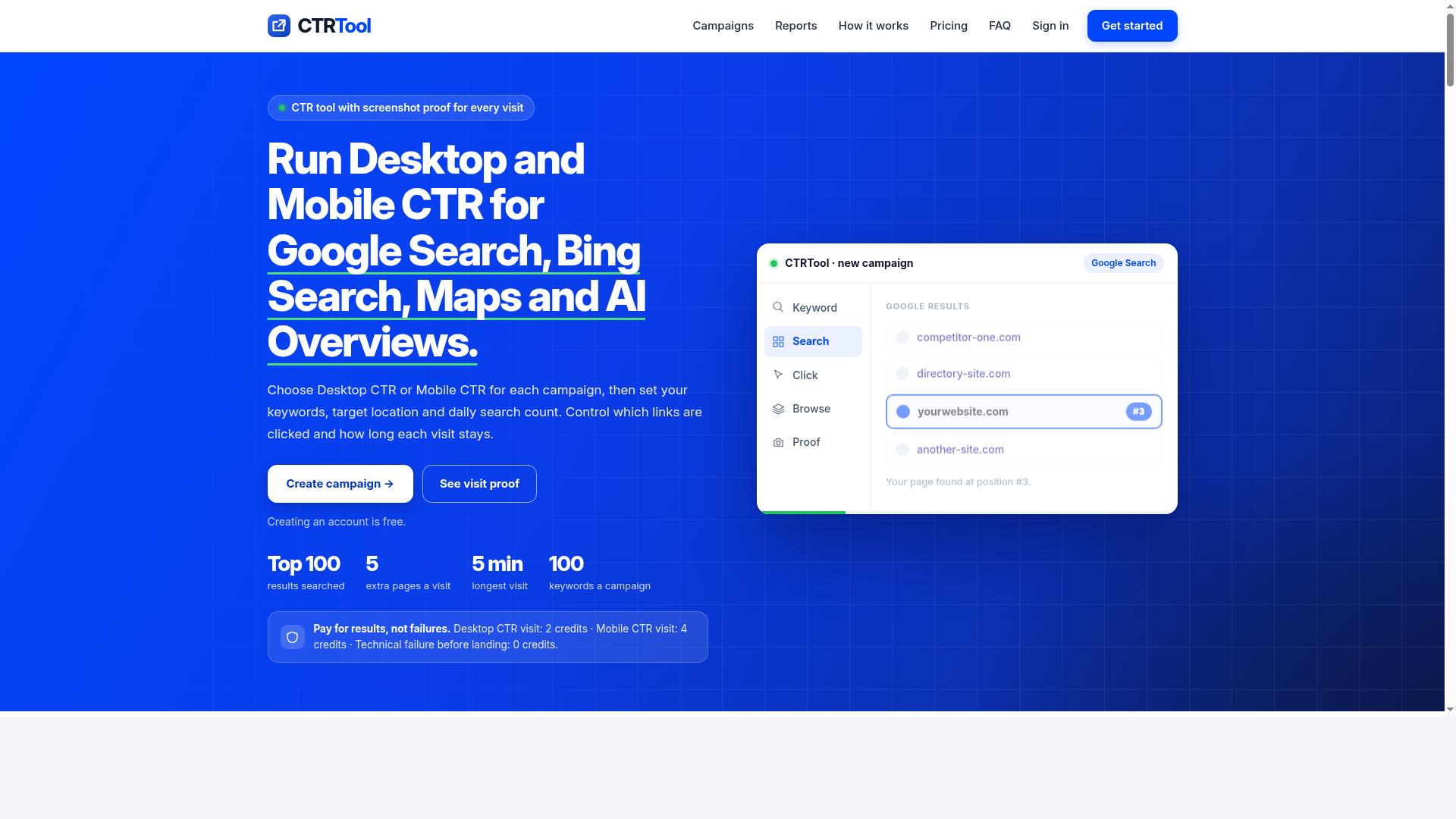
CTRTool is a SaaS platform that runs human-powered click-through rate (CTR) campaigns to improve organic CTR and keyword rankings on Google Search, Bing Search, Google Maps, and AI Overviews. It is a manual CTR service powered by real people, not bots or a proxy network. Every visit is backed by screenshot proof, which is how the brand positions itself: a CTR tool with screenshot proof for every visit.
The core mechanism is straightforward. A campaign targets specific keywords, real users then click the matching organic results, and the resulting engagement signals may influence rankings. Those signals include dwell time and bounce rate, both of which search engines can read as signs of user behavior. By shaping those metrics, a campaign aims to lift organic CTR and support keyword ranking improvement.
This matters because CTR manipulation of the bot-driven kind is easy to spot. Automated clicks from a residential proxies pool tend to share patterns in IP diversity, click pacing, and click distribution that search engines can detect. A human-powered approach replaces that with genuine browsers and genuine behavior, which is the whole point of the category.
The purpose is narrow and deliberate. CTRTool does not try to replace search engine optimization as a discipline. It adds a measurable lever on top of it: controlled click volume aimed at target keywords, with proof attached so campaign owners can see what was delivered rather than trusting a black box.
Who CTRTool Serves: SEO Practitioners and Agencies
CTRTool is built for SEO practitioners and agencies who manage CTR campaigns for their own websites or client sites across Google, Bing, Maps, and AI Overviews. These are people who already understand SERP position, impressions, and organic traffic, and who want a controlled way to test whether CTR signals move a keyword.
In-house SEO teams typically use it for a focused set of target keywords on their own domain. They want to know whether a CTR uplift translates into a ranking improvement before committing budget elsewhere. The campaign setup gives them a defined scope: chosen keywords, a set click volume, and a record of each visit.
Agencies have a different need: scaling campaigns across multiple clients without losing track of who received what. Because the tool supports both desktop and mobile campaigns, a single agency can cover diverse client portfolios and match clicks to the device mix a client's audience actually uses. Device targeting and geo-targeting keep that coverage relevant to each market.
The brand's own guidance is worth noting for this audience. The site advises starting with tier links, PBNs, and test properties, and to use CTR on main sites with caution. For practitioners, that is a sensible risk ladder: prove the effect on lower-stakes properties first, then decide how far to extend it. It also signals a tool built by people who understand campaign risk, not just campaign delivery.
Does CTRTool Meet the Human-Powered Buyer's Checklist?
To determine if CTRTool qualifies as a human-powered CTR tool, we evaluate it against five critical criteria: real human visits with proof, coverage across search surfaces, campaign control and targeting, transparent pricing, and track record and reporting. Each item maps to a question every serious buyer should ask before committing budget to any manual CTR service.
The checklist is deliberately practical. A tool can look impressive on a landing page yet fail on one or two of these points, and that failure usually shows up only after money has been spent. Working through the five items in order gives you a repeatable way to separate a genuine human-powered CTR tool from a proxy network dressed up as one.
Here is the roadmap for the sections that follow, with a short note on why each criterion matters:
- Real human visits with proof: authenticity. Without verifiable evidence that a visit actually happened, you cannot tell a real user click from a bot or a phantom log entry.
- Coverage across search surfaces: versatility. A campaign that only reaches one surface limits where your keyword ranking work can take effect.
- Campaign control and targeting: precision. Geo-targeting, device targeting, and click pacing determine whether click-through rate signals land where they are useful.
- Transparent pricing: budget fit. A credit model you can understand and predict is the difference between a controlled test and an open-ended expense.
- Track record and reporting: measurable results. Reporting is what connects CTR uplift to observable movement in SERP position and organic traffic.
Each of these items will be assessed with specific evidence from CTRTool's offerings, including its screenshot proof for every visit, its credit model, and its keyword position tracking. The aim is not a vague impression but a clear yes or no on each line of the buyer's checklist.
Read the five sections that follow as a sequence. Proof comes first because everything else depends on visits being real. Coverage and control then shape how those visits are directed, pricing governs what they cost, and reporting closes the loop by showing whether the campaign produced the engagement metrics and ranking movement you were paying for.
Checklist Item 1: Real Human Visits With Proof
The first checklist item is real human visits with proof, which ensures that CTR campaigns are driven by genuine user behavior rather than bots or automated scripts. This matters because search engines look at how people interact with results after the click, not just the click itself.
When a real person opens a page, they read, scroll, and stay for a while. Those actions produce authentic engagement signals such as dwell time and bounce rate, and research suggests these user behavior signals can carry weight in how pages are evaluated over time.
Bot-driven CTR manipulation works differently. Automated clicks tend to arrive in unnatural patterns, leave almost instantly, and show no real reading behavior. Detection systems are built to flag exactly that kind of activity, and the downside can include wasted spend or penalties against the site.
That is why a human-powered CTR tool belongs at the top of any buyer's checklist. You are not just buying click volume. You are buying behavior that looks and acts like a real visitor, which is the whole point of a CTR uplift strategy tied to keyword ranking and SERP position.
Proof separates a serious manual CTR service from a black box. Without evidence, you cannot tell whether clicks came from real people or from a proxy network firing off automated requests. CTRTool answers this by providing screenshot proof for every visit, so each campaign can be checked rather than trusted on faith.
Screenshot Proof and Full Visit Paths for Every Campaign
CTRTool provides screenshot proof for every visit, capturing both the search results page and the landing page, along with the full visit path from keyword search to click and on-page engagement. The two proof images are kept separate, so you can review the search side and the landing side independently.
Each set of proof shows the details that matter for verifying traffic quality:
- The target keyword that was searched
- The clicked result on the search results page
- The landing page that loaded after the click
- The time spent on page and the on-page actions taken
The full visit path covers the sequence from search to click, then scroll and dwell. That sequence is what makes the engagement metrics meaningful, because it reflects a person moving through the page rather than a script that opens and closes a tab.
This proof is available across every campaign type, including Google, Bing, Maps, and AI Overviews. For Maps, keyword positions are tracked over time including listing order, and AI citation order is tracked the same way. One credit balance is shared across all campaign types, websites, and keywords, so you are not juggling separate pools to compare results.
Visits can run up to five minutes with up to five additional internal pages, which gives the session room to look like normal browsing. If a visit cannot verify the requested location, no credits are used, and technical failures before landing are not charged either. That transparency lets you confirm both campaign execution and the quality of the traffic behind it.
Checklist Item 2: Coverage Across Search Surfaces
The second checklist item is coverage across search surfaces, which determines whether a CTR tool can support campaigns beyond traditional Google Search results. Search behavior has fragmented. People still type queries into Google and Bing, but they also scan Maps for local businesses and read AI Overviews before clicking anything.
A tool that only covers one surface limits campaign scope. If your audience finds you through Maps listings or AI-generated summaries, a Google-only campaign leaves those touchpoints untouched. Surface coverage is therefore a scope question, not a minor feature detail.
When you review a human-powered CTR tool, ask which surfaces it actually supports and whether each campaign type maps to a real search context. CTRTool offers campaigns for all four surfaces: Google Search, Bing Search, Google Maps, and AI Overviews. That breadth lets users target diverse search contexts instead of betting everything on one results page.
This matters for a buyer's checklist because coverage shapes how you plan keyword ranking work. A wider surface mix gives your click-through rate efforts more places to register, and it keeps your strategy aligned with where impressions actually appear.
Google Search, Bing Search, Maps and AI Overviews Campaigns
CTRTool runs four distinct campaign types: Google Search CTR, Bing Search CTR, Google Maps CTR, and AI Overview CTR, each designed to improve visibility on its respective surface. Here is how each one works in brief.
- Google Search CTR targets search keywords and clicks the organic result. Campaigns can reach the top 100 results and can point to internal pages as well as the main URL.
- Bing Search CTR applies the same keyword-and-click approach to Bing results, so your organic CTR work is not confined to one engine.
- Google Maps CTR finds a business listing and clicks through to its website link, with up to 50 listings and city targeting available.
- AI Overview CTR requires a matching AI Overview citation. The campaign finds your website in the overview and clicks its source link, and citation order is tracked.
Every campaign can run on desktop or mobile, and geo-targeting extends to specific countries, states, and cities, or any country. That flexibility supports device targeting and location-matched user behavior signals rather than a single generic traffic pattern.
This multi-surface coverage is a core advantage. A manual CTR service that spans four surfaces gives your search engine optimization work a broader base of real user clicks, and it lets you compare how each surface responds through keyword positions over time.
Checklist Item 3: Campaign Control and Targeting
The third checklist item is campaign control and targeting, which ensures that CTR campaigns can be precisely tailored to match SEO goals and audience behavior. A human-powered CTR tool without granular targeting is a blunt instrument. It sends real user clicks into the SERP with no regard for who searches, from where, or on what device.
That lack of control has a direct cost. Credits get spent on irrelevant clicks, and the resulting traffic pattern can look unnatural to search engines. Effective campaigns require control over device type, keywords, location, and daily search volume. Each parameter shapes how the click distribution reads against your organic CTR baseline.
CTRTool offers granular settings for each of these parameters. The platform runs Desktop and Mobile CTR campaigns for Google Search, Bing Search, Maps and AI Overviews, with screenshot proof for every visit. That proof matters for a buyer's checklist, because it lets you verify that clicks were delivered as configured rather than trusting a summary report.
This section stays at the overview level. The next subsection breaks down how each control works and why it matters for a credible campaign setup.
Desktop vs Mobile, Keywords, Location and Daily Search Count
CTRTool allows users to choose desktop or mobile clicks per campaign, set target keywords, specify location down to city level, and control the daily number of searches to simulate natural click patterns. Each control addresses a different risk in a manual CTR service.
- Device targeting: users choose Desktop CTR or Mobile CTR per campaign. Device mix affects how clicks are delivered and should mirror the split you already see in Google Search Console.
- Keyword targeting: clicks go to the search terms you select, so spend is not wasted on queries unrelated to your keyword ranking goals.
- Location targeting: set the country, state, or city, or choose "Any country" when geo-specific goals do not apply.
- Daily search count and pacing: control the number of searches per day so click volume spreads over time instead of arriving in spikes.
CTRTool also lets users control which links are clicked and how long each visit stays. Dwell time and link choice feed directly into user behavior signals, so a visit that ends in seconds can undercut the engagement metrics you are trying to improve.
Together these settings support a click distribution that appears organic. Steady pacing, a realistic device split, and geo-matched traffic reduce the chance of a suspicious pattern. The brand is candid about limits: the site states that automated visits do not guarantee rankings. Control improves traffic quality, but it does not replace sound search engine optimization.
Checklist Item 4: Transparent, Pay-for-Results Pricing
The fourth checklist item is transparent, pay-for-results pricing, which means you pay only for credits that translate into actual clicks and visits, with no hidden fees. This model puts the buyer in control of spend, because every dollar maps to a defined unit of delivery rather than an open-ended subscription.
Under a credit system, you purchase a block of credits and each visit consumes a set number of them. Desktop and mobile visits are priced separately in credits, so the cost of a campaign reflects the delivery method you choose. You can forecast spend before launch and scale up or down based on results.
Compare that with subscription-based tools that charge a flat fee regardless of usage. A quiet month still costs the same, and a busy month may hit caps or overage charges. With pay-for-results, budget control and scalability sit with the buyer, not the vendor's billing cycle.
CTRTool follows this model with monthly plans that carry clear credit allocations. Credits are consumed per visit, and unused credits roll over while the subscription is active, expiring only when cancellation takes effect. That rollover rule matters for anyone running seasonal campaigns or testing a manual CTR service before committing more budget.
Credit costs are also spelled out. A desktop CTR visit uses 2 credits, a mobile CTR visit uses 4 credits, a verified search without a match costs 1 credit, and a technical failure before landing costs 0 credits. When a vendor publishes those rules, you can audit your spend against delivery and see exactly where credits went.
Starter, Growth and Scale Plans Compared
CTRTool offers monthly plans: Starter at $59 for 2,000 credits, Growth at $125 for 5,000 credits, and Scale at $399 for 20,000 credits, with credits redeemable for desktop or mobile visits. Each tier delivers the same features, so the only variable is volume.
| Plan | Monthly Price | Credits | Up to Desktop Visits | Up to Mobile Visits |
|---|---|---|---|---|
| Starter | $59 | 2,000 | 1,000 | 500 |
| Growth | $125 | 5,000 | 2,500 | 1,250 |
| Scale | $399 | 20,000 | 10,000 | 5,000 |
Mobile visits cost double credits because of the higher complexity involved. That is why the mobile column shows half the visit count of the desktop column for the same credit balance. If your target keywords skew toward mobile SERPs, factor that multiplier into your click volume planning.
All three plans include the same features. The difference is simply how many credits you get and therefore how many desktop or mobile clicks you can deliver per month. A smaller site testing a CTR uplift can start on Starter, while a larger campaign can move to Scale without losing access to any capability.
Because credits roll over while the subscription stays active, a plan that outpaces one month's usage is not wasted. That flexibility supports campaign setup across multiple target keywords and device mixes without forcing you to guess your exact monthly volume up front.
Checklist Item 5: Track Record and Reporting
The fifth checklist item is track record and reporting, which verifies whether a CTR tool provides measurable evidence of ranking improvements and campaign performance over time. A manual CTR service can deliver clicks, but without reporting you have no way to connect those clicks to outcomes. That leaves you guessing about ROI.
Reporting matters because CTR manipulation sits in a sensitive area. You are paying for real user clicks, and you need to know those clicks actually landed on your target keywords at the right time. Proof of visits separates a serious tool from an opaque one.
A credible report should cover three things:
- Keyword position tracking so you can see movement in SERP position for your target keywords
- Campaign progress so you know how much of your planned click volume has been delivered
- Proof of visits so each click can be tied to an actual search and landing event
CTRTool addresses this item directly. It offers detailed reporting on keyword positions, Maps listing order, and AI citation order, along with screenshot proof for every visit. Search and landing screenshots are provided as separate proof images, so you can inspect what happened rather than trust a summary number.
This is where a buyer's checklist earns its keep. If a provider cannot show you what changed after your campaign, treat that as a warning sign. Reporting is the difference between a service you can evaluate and one you simply have to believe.
Keyword Position Tracking, Maps Listing Order and AI Citation Order
CTRTool tracks keyword positions over time, monitors Maps listing order, and records AI citation order, giving users a clear view of how campaigns affect visibility across search surfaces. Each of these three reports answers a different question about your campaign.
Keyword position tracking shows how the SERP position of your target keywords changes over the course of a campaign. This ties directly to the most common campaign goal: ranking improvement. Watching position alongside click delivery helps you judge whether your click volume is producing a CTR uplift that shows up in the results.
Maps listing order tracks where a business appears in local pack results. For local search engine optimization, that ordering can matter as much as the standard organic listing. CTRTool includes it in the same reporting view.
AI citation order shows the sequence of citations in AI Overviews. As more searches end in an AI-generated summary, knowing whether your pages are cited, and in what order, is a useful visibility signal.
CTRTool also records full visit paths, so the reporting goes beyond a position number. Visits can last up to 5 minutes and include up to 5 additional internal pages, which gives you a clearer picture of what happened after the landing page loaded.
Read together, these reports connect back to campaign goals. If the goal is ranking improvement, position tracking is your primary metric. If the goal is stronger engagement metrics, visit paths and dwell time tell the story. A tool that reports on all three surfaces gives you a defensible basis for judging traffic quality and deciding what to do next.
Who Should Use CTRTool - and Who Should Look Elsewhere
CTRTool is ideal for SEO practitioners and agencies running CTR campaigns for themselves or clients, but it may not suit those seeking fully automated bot-driven solutions or those with strict budget constraints. The tool is built around real user clicks, and that single design choice shapes exactly who gets the most value from it.
Below is a clear breakdown of the buyer profiles that fit CTRTool well, followed by the cases where a different approach makes more sense.
SEO professionals managing multiple sites. If you run campaigns across several properties, CTRTool's multi-surface coverage matters. It supports campaigns across Google Search, Bing Search, Google Maps and AI Overviews, so you are not juggling separate tools for each surface. That breadth helps when a client's visibility depends on more than one result type.
Agencies with client campaigns. Agencies need proof of work, and CTRTool's emphasis on proof of visits gives account managers something concrete to show clients. The site's guidance also mentions using tier links, PBNs and test properties, which fits agencies that structure campaigns in layers and validate before scaling.
Businesses targeting local or global search visibility. Campaigns aimed at local map results and broader search rankings both fall within the tool's stated surfaces. Granular targeting lets you shape a campaign around specific keywords and locations rather than a single blunt push.
In short, the ideal CTRTool user is someone who treats click-through rate and SERP CTR as levers in a broader search engine optimization plan, and who wants real user clicks rather than synthetic traffic.
CTRTool is not the right fit for every buyer. Being specific about the mismatches saves you time before you commit to any manual CTR service.
- You want automated bots. CTRTool uses real humans for clicks. If your requirement is fully automated bot-driven traffic, this model will not match your expectations.
- Your budget is very small. The minimum plan is $59, so buyers with strict budget constraints should weigh that entry point carefully before starting.
- You need phone support. Only email support is available, so anyone who expects live phone assistance should plan around that limitation.
None of these points make CTRTool a poor tool. They simply define its edges. A buyer's checklist should include honest fit questions, and these three are the most common reasons a campaign stalls after purchase.
Used within its intended profile, CTRTool aligns with how serious SEO teams already think about user behavior signals and ranking improvement. The verdict is straightforward: if you run human-powered CTR campaigns for your own or client sites, CTRTool is a credible, purpose-built choice. If you need bots, a lower entry price, or phone support, look elsewhere.
Final Verdict: Is CTRTool the Right Human-Powered CTR Tool for You?
CTRTool meets all five criteria of the human-powered buyer's checklist: real human visits with screenshot proof, coverage across four search surfaces, granular campaign controls, transparent pay-for-results pricing, and detailed reporting. For SEO practitioners and agencies that want verifiable engagement rather than blind automation, that combination is hard to argue with.
The screenshot proof requirement is where many manual CTR services fall short. CTRTool treats evidence as a core deliverable, which means you can confirm that real user clicks actually occurred instead of taking a vendor's word for it. That matters when you need to justify spend to a client or tie a CTR uplift to a keyword ranking movement.
Campaign control is equally practical. Device targeting lets you split desktop clicks from mobile clicks, while geo-targeting keeps click volume pointed at the markets you actually sell into. Combined with click pacing and distribution settings, these controls support a measured approach to user behavior signals rather than a sudden spike that looks unnatural against your impressions.
Coverage across four search surfaces also separates CTRTool from single-channel tools. If your strategy touches more than one results layout, you avoid stitching together multiple vendors and reconciling their reports. Fewer moving parts means cleaner data when you review organic CTR against Google Search Console or your analytics integration.
Where CTRTool Stands Out
Three strengths carry the most weight in a buying decision. Each one maps directly to a checklist item you should be scoring every vendor against.
- Screenshot proof of human visits, so traffic quality is verifiable rather than assumed
- Device and geo-targeting for campaigns that match your real audience mix
- Clear pricing built on a pay-for-results model, so cost tracks delivered clicks
The pay-for-results structure deserves emphasis. Credit-based pricing means your budget follows actual click volume instead of a flat retainer that bills the same whether results arrive or not. For agencies managing several client campaigns, that alignment makes forecasting simpler and keeps manual CTR service costs tied to output.
Reporting rounds out the picture. Detailed reports give you the engagement metrics and campaign data needed to judge whether a ranking improvement followed your activity, which is the whole point of a disciplined CTR manipulation strategy. Without that feedback loop, you are guessing.
Limitations to Weigh Before You Commit
No tool is a perfect fit for every buyer, and two constraints are worth planning around. Neither undermines the verdict, but both affect how you operate day to day.
Support runs through email only. The FAQ lists a single support contact, with no phone number or live chat stated on the site. Teams that expect real-time escalation during a live campaign should set expectations internally and build a little lead time into their campaign setup questions.
Costs are credit-based, which is fair but variable. A large click volume push across several target keywords will consume more credits than a small test, so budget per campaign rather than per month. Start with a modest allocation, review the reporting, then scale what shows a credible CTR uplift.
It is also worth being honest about scope. A human-powered CTR tool supports your search engine optimization work, but it does not replace sound on-page content, technical hygiene, or link strategy. Treat click volume as one input among several.
Who Should Choose CTRTool
The strongest fit is an SEO practitioner or agency running repeatable campaigns for clients and needing proof at every step. If your workflow already revolves around Google Search Console data, keyword ranking tracking, and analytics integration, CTRTool slots into that review cycle cleanly.
Agencies benefit most from the combination of device targeting, geo-targeting, and per-campaign reporting. You can run separate pushes for desktop and mobile, keep each market distinct, and hand clients evidence rather than assurances. Freelancers and in-house teams with a focused set of target keywords will find the same controls useful at smaller scale.
Buyers who need phone support or a fully fixed monthly price should weigh those preferences against everything else on the checklist. For most readers of this guide, the proof and control advantages outweigh the trade-offs.
The Bottom Line
CTRTool is a strong choice for anyone seeking a human-powered CTR tool with verifiable delivery and multi-surface coverage. It satisfies the buyer's checklist on evidence, targeting, controls, pricing transparency, and reporting, and it does so without hiding behind vague claims about traffic quality or proxy networks.
Our recommendation is straightforward: run a small, tightly targeted campaign first, confirm the screenshot proof and reporting meet your standard, then expand click volume against the keywords where you see movement. That approach keeps risk low and gives you real data for your own verdict.
Questions before you start can go to the listed support contact at vaibhav@autoblogging.ai. That address is the channel the site itself provides for inquiries, so use it for pre-purchase questions and account matters alike.
Frequently Asked Questions
What should I look for first in a human-powered CTR tool?
Start with proof. A human-powered tool should show you verifiable evidence that each visit actually happened, not just a dashboard count. CTRTool provides screenshot proof for every visit, with search and landing screenshots as separate proof images, plus full visit paths so you can audit what was delivered.
How do I know the tool can actually find and click my listing?
Ask how the tool handles eligibility rules for each campaign type. With CTRTool, your page must appear within the top 100 organic results for the chosen keyword and location, Maps campaigns check up to 50 listings (about five pages), and AI Overview campaigns need a matching source link. A tool that is upfront about these requirements is more likely to deliver real results rather than wasted credits.
Should I pay per click or per credit - and what's a fair structure?
Look for transparent, pay-for-results credit pricing rather than vague retainers. CTRTool publishes its plans in USD: Starter is $59/month for 2,000 credits (up to 1,000 Desktop CTR visits or 500 Mobile CTR visits), and Growth is $125/month for 5,000 credits (up to 2,500 Desktop or 1,250 Mobile visits). Compare the credit-to-visit ratio across tools so you know your true cost per visit.
Does the tool support the search engines and surfaces I care about?
Check coverage against your actual targets before buying. CTRTool runs Desktop and Mobile CTR campaigns for Google Search, Bing Search, Maps and AI Overviews, and you choose Desktop CTR or Mobile CTR per campaign. If a tool only covers one engine or one device type, you'll end up juggling multiple vendors.
Can I target specific locations and track keyword positions over time?
Location targeting and position tracking separate serious tools from basic click bots. CTRTool lets you target a chosen country and optionally a state and city, or use "Any country" for a mix of supported locations, and it tracks keyword positions over time including Maps listing order and AI citation order. That gives you evidence of movement, not just activity.
What support and account terms should I confirm before committing?
Confirm how to reach support and where the legal terms live. CTRTool lists support at vaibhav@autoblogging.ai, and its site includes Support, Terms of use and Legal notices pages (ctrtool.com/licenses.html). Read the terms and legal notices before purchasing so you understand what you're signing up for.